Ever notice how some local businesses always seem to show up first on Google while your place is hard to find? That is usually Local SEO at work. The good news is that you can do the same things they do. This guide walks you through it, from the basics to the harder parts, in plain language you can use starting today.
The goal of Local SEO is simple: show up when people nearby search for what you do. When that works, customers find you instead of you having to chase them.
Think back to the last time you needed something quick. Maybe your kid woke up with a fever and you needed an urgent care clinic. Or your sink started leaking at 8 PM on a Sunday. Or you just had a craving for really good tacos.
What did you do? You grabbed your phone. You typed something like "urgent care near me" or "24 hour plumber" or "best tacos in town." And within seconds, Google showed you a handful of businesses right there on a map, with their hours, their phone numbers, and stars from real customers.
You probably clicked on one of the top few. Maybe you called them. Maybe you drove straight there.
That moment, when a customer picks a business from a short list, is what Local SEO is about. It decides whether your business is on that list or not on it at all.
Local SEO is not something you set up once and forget. It takes steady work. But if you run a small business that serves people in your community, I think it is one of the best places to put your marketing time and money. You do not need a TV ad or a billboard. You need to show up when your neighbors are looking for what you sell.

What exactly is Local SEO?
Local Search Engine Optimization is a big name for a simple idea: helping Google understand who you are, where you are, what you do, and who you serve. Then, when someone in your area searches for what you offer, Google can show them your business.
So Local SEO is the part of search marketing that helps people near you find your business.
Regular SEO can feel like trying to be famous everywhere at once. You compete with everyone, and that gets expensive. Local SEO is smaller and closer to home. The goal is to be the business people in your town know and trust for what you do. You do not have to beat a national chain on its own terms. Your strengths are different: you are right here, you know your customers by name, and maybe you even answer your phone at 9 PM.
The Three Pillars of Local Search
Google does not pick businesses at random. It tries to give each searcher the best answer quickly. For local results, Google says it looks mainly at three things: relevance, distance (how close you are), and prominence. Knowing these three helps you see what you can change.
1. Relevance: Does Your Business Match What They Are Searching For?
This one is pretty simple on the surface. If someone searches for "veterinarian," Google wants to show them vet clinics, not pet stores. But digging deeper, relevance is about how clearly you have told Google what you do.
Imagine you own a bakery. You bake bread, cookies, and cakes. But you also make really good coffee. If someone searches for "coffee shop near me," will Google show your bakery? Only if you have told them that coffee is part of your business.
That is why the words on your website, your Google Business Profile categories, and the way your business is described around the web all matter. Be clear about everything you offer, and spell it out so Google does not have to guess.
2. Proximity: How Close Are You to the Person Searching?
This one feels a little unfair sometimes because you cannot control it. If someone searches from the north side of town and you are on the south side, the businesses closer to them might show up first.
Distance is not the only thing, though. Google weighs it together with relevance and prominence, so a business a little farther away can still show up first if it is a better match for the search. Clear hours and a full list of your services (for example, emergency calls) help Google see when you are that better match.
You cannot change your address, but you can make every other part of your profile clear and complete.
3. Prominence: How Well-Known and Trusted Is Your Business?
This is the pillar you have the most control over. Prominence is basically Google's way of asking "Is this business legit? Do people like them? Do other websites talk about them?"
Google says prominence is about how well known your business is, online and off. Things that feed into it include:
- How many reviews do you have? What do those reviews say? Did you respond to them?
- Are you listed in online directories like Yelp, Yellow Pages, and your local Chamber of Commerce website?
- Do other local websites link to your website? Maybe a local news story mentioned you, or a community blog recommended you.
- Do people search for your business by name?
The more real, positive attention your business gets online, the more prominent it looks to Google, and that can help you show up more often.
Why Your Business Needs Local SEO Right Now
Think about how often people look for something close by: a plumber, a pharmacy, a place to eat.
A lot of those people want to buy soon, and Google's own research backs that up.
In research published in 2016, Google's own research found that 76 percent of people who search on their phone for something nearby visit a related business within a day, and 28 percent of those searches end in a purchase. The numbers are a few years old, but they show how close a local search is to a sale.
So when someone finds you through local search, there is a good chance they want to buy soon, often the same day.
If your business does not show up for those searches, those people call someone else, usually a competitor who does show up.
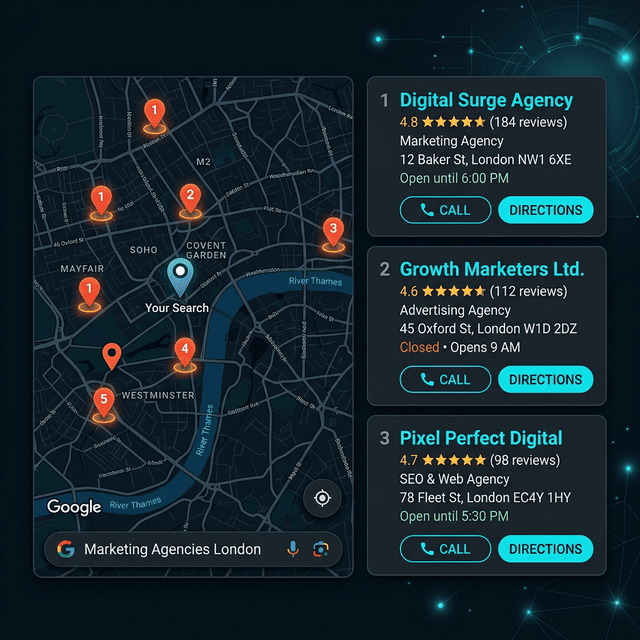
The "Local Pack" is the map and short list of businesses near the top of many local searches. Getting into it puts you in front of people who are ready to choose.
The Local Pack: Your New Best Friend
You have seen the Local Pack a hundred times even if you did not know what it was called. It is that box that shows up at the top of Google with the map and three business listings. Each listing shows the business name, their star rating, a snippet of a review, their address, phone number, and sometimes hours or a website link.
For a local business, this box is worth a lot because it often shows up above the regular search results and articles.
People trust the Local Pack. They see the stars and the map, and it feels like Google has already picked the best options for them. If you are not in the pack, you are competing for the people who keep scrolling below it.
Deep Dive into Your Google Business Profile
Now for the hands-on part. If you only do one thing after reading this guide, set up your Google Business Profile and fill it out completely. Almost everything else in local search builds on it.
What is a Google Business Profile?
It used to be called Google My Business. Now it is called Google Business Profile. It is the free listing that lets you control how your business appears on Google Search and Google Maps. Think of it as your business's ID card for Google. It tells them who you are, where you are, and when you are open.
Step by Step Setup and Optimization
Claim or create your profile
Go to google.com/business and follow the steps to manage your profile. Search for your business. If it is already there, claim it. If not, create a new one. Setting it up is free. Google will also ask you to verify that you own the business before you can manage it, and that step can take extra time.
Fill out every single field completely
Fill in every field, not only the required ones. Your business name should be your real business name, not stuffed with keywords. "Joe's Pizza" not "Joe's Pizza Best Pizza in Chicago." That kind of keyword stuffing can get you suspended.
Choose your categories carefully
Your primary category is the most important choice you will make. This tells Google what your core business is. If you are a pizza place, "Pizza Restaurant" should be your primary category. Then you can add secondary categories like "Italian Restaurant" or "Delivery Restaurant." Be accurate and specific.
Take time with this. Look at what categories your competitors are using. Pick the ones that fit you best. You get one primary category and up to nine more. Only add ones that truly fit your business.
Add your address exactly as it appears everywhere else
If you are a brick and mortar shop where customers visit, use your full street address. If you are a service area business like a plumber or electrician who travels to customers, you will hide your address and set your service areas instead. Be honest about the areas you actually serve.
Enter your phone number and website
Use a local phone number if you have one. Your website should go to your homepage unless you have a special landing page for local customers. Some businesses use a tracking number here to see how many calls come from Google. That is fine too.
Add your hours
Add your regular hours and set special hours for holidays. Keep them up to date. Few things upset customers more than driving to a business that turns out to be closed. If you close for a vacation or a holiday, update your hours temporarily.
Write a great business description
This is your chance to tell your story in up to 750 characters: who you are, what you stand for, and why someone should choose you. Use real words real people say. Mention your city and neighborhood naturally.
Do not just list keywords. If you run a restaurant, you might mention a family recipe or the local farms you buy from. Say why you love what you do, in your own words.
Add photos constantly
Add lots of them: your storefront so people recognize it when they drive by, your team so customers feel they already know you, your products or your food, and happy customers (with their permission).
Businesses with photos tend to get more clicks and more requests for directions. Add new photos often so people can see your business is open and active.
Use the posts feature
Google lets you add posts to your profile, a lot like social media. Share specials, events, new products, or a quick update. Regular posts show people your business is active. Update posts used to disappear after 7 days, but since early 2021 they stay up much longer. Event and offer posts end on the date you set.
Add products or services
If you have a menu, upload it. If you offer specific services, list them with descriptions and prices. This helps customers understand exactly what you do before they even contact you. It also helps Google understand your business better.
Answer calls and messages quickly
Google used to let customers chat with you right from your profile, but it shut that chat feature down in July 2024. Now people reach you by phone, through your website, or by email. Whichever way they use, answer quickly. Nothing says "we do not care" like a call or message nobody returns.
Answer common questions on your website
Business Profiles used to have a public questions and answers section. Google removed it in late 2025 and replaced it with an "Ask" button that uses AI to answer from your profile, your reviews, and your photos. So keep your profile complete and accurate, and put clear answers to the questions customers ask you every day on your own website.
The Critical Role of Citations and Consistency
What Are Citations Anyway?
A citation is simply any place online where your business name, address, and phone number appear. Think of them like digital mentions. They can be on directory sites like Yelp or Yellow Pages. They can be on social media like Facebook. They can be on your local Chamber of Commerce website. They can even be on a local blog that mentioned you in an article about the best restaurants in town.
Each mention helps show that your business is real and established. Google says it looks at information from across the web, like links, articles, and directories, when it judges how well known a business is.
The NAP Rule: Name, Address, Phone
This part matters. Your Name, Address, and Phone number (NAP for short) should match everywhere they appear.
Tiny style differences, like "Main Street" on one site and "Main St." on another, are less of a worry than wrong details. An old address, an old phone number, or a different business name on some sites confuses customers and makes it harder for Google to know which details are right.
Still, pick one format for your address and phone number and use it everywhere. It is the easiest way to avoid mix-ups.
Where Should You Get Citations?
Start with the big sites that customers actually use:
- Yelp
- Facebook Business
- Apple Maps
- Bing Places
- Yellow Pages
- BBB (Better Business Bureau)
- Foursquare
- MapQuest
Then go local. Search for your city name plus "business directory" or "chamber of commerce." Many local chambers list members on their website. Local news sites sometimes have business directories too. These local listings are worth having because they tie your business to your area.
Then go industry specific. If you are a wedding photographer, get listed on wedding sites. If you are a contractor, get listed on home improvement sites. If you are a dentist, get listed on dental directories.
You do not need to be on every site on the internet, only the ones that matter for your business and your area. A handful of accurate listings on well-known sites is better than a long list on junk directories.
Reviews: Reputation Management as an SEO Strategy
Why Reviews Matter So Much
Reviews help you in two ways. They help real people decide to trust you, and they are part of how Google ranks local businesses.
Google says more reviews and good ratings can help your local ranking. And when real people see those stars and read those kind words, they think "these folks seem legit, I will call them." That gets you more customers.
How to Actually Get More Reviews
Many happy customers will leave a review if you ask. They just need a reminder and an easy link. Here are some ways to ask:
Ask in person
When a customer tells you how happy they are, smile and say "I am so glad to hear that! If you have a moment later, would you mind leaving us a review on Google? It helps us out a ton."
Send a follow up email or text
After a service is complete, send a quick message. "Thanks for choosing us! We hope you are happy with everything. If you have a minute, we would love to hear your feedback on Google. Here is the link." Include a direct link to your Google review page to make it easy.
Put up a sign
A small sign at your checkout counter that says "Love us? Leave us a review!" with a QR code makes it easy. People can scan and review right there on their phone.
Add it to your receipts or invoices
A simple line at the bottom of your receipt or invoice that says "Thanks for your business! Please review us at [link]" reminds people when they are looking at their paperwork later.
How to Respond to Reviews (Yes, All of Them)
Replying to reviews matters too. It shows customers that you care and that someone is paying attention to your profile. Google also lists replying to reviews as one of its own tips for local ranking.
For positive reviews
Thank them genuinely. Mention something specific from their review if you can. "Thanks so much Sarah! We are thrilled you loved the chocolate cake. It is our grandmother's recipe. Hope to see you again soon!" This personal touch makes people feel appreciated.
For negative reviews
First, take a deep breath. Do not get defensive. Respond professionally and kindly. Apologize for their experience even if you think they are wrong. Thank them for their feedback. If appropriate, offer to make things right offline. "We are sorry to hear about your experience. That is not the standard we aim for. Would you please call us at [number] so we can make this right?"
Future customers who read your reply will see that you care about making things right. A calm, kind reply can matter more to them than the bad review itself.
Review Platforms That Matter
Google reviews matter most for local SEO because Google uses them in local ranking. But other platforms matter too depending on your business.
- Yelp is widely used for restaurants, retail, and home services
- Facebook reviews show up in social search
- Industry specific sites like Avvo for lawyers or Healthgrades for doctors can matter a lot in those fields
- BBB reviews carry weight for trust based businesses
On Page SEO for Local Businesses
Your website is your home base. Your Google profile and your listings point people back to it, so it needs to turn those visitors into customers.
Local Keyword Research
Keywords are just the words people type into Google when they search. Your job is to figure out what words your ideal customers use and then use those same words on your website.
For local SEO, you want to combine what you do with where you do it. Think "plumber Austin" not just "plumber." Think "bakery downtown Portland" not just "bakery." Think "emergency dentist open Sunday" if that is something you offer.
How do you find these keywords? Start by typing into Google and seeing what autocomplete suggests. Look at what words your competitors use on their websites. Think about the questions customers ask you every day. Those questions are keywords too.
Where to Put Your Keywords
Page titles
This is the big blue link in search results. Make sure your most important local keywords appear here. "Affordable Plumber in Austin | Joe's Plumbing" tells Google and searchers exactly what you do and where.
Headers
These are the section titles on your page. Use local keywords naturally in your H1, H2, and H3 tags. "We Serve Families Throughout Austin and Round Rock" is a good header that includes your location.
Page content
Write naturally about your services and your area. Mention neighborhoods you serve. Talk about local landmarks. Write about local events you participate in. This helps Google connect you to your location.
Meta descriptions
These are the short descriptions under your page title in search results. They do not help ranking directly, but they help people decide to click. Make them clear and inviting, and include local keywords naturally.
Image file names and alt text
When you upload photos, name them something descriptive like "austin-plumber-fixing-sink.jpg" instead of "IMG_5271.jpg." And use alt text that describes the image for accessibility and for Google.
Create Location Pages (If You Serve Multiple Areas)
If you serve multiple cities or neighborhoods, create a separate page for each one. But do not just copy and paste the same content and change the city name. That kind of copy looks spammy to Google and to readers.
Instead, write unique content for each location. Mention local landmarks. Talk about specific projects you have done there. Include testimonials from customers in that area. Show that you really know and serve that community.
Mobile Matters More Than You Think
A lot of local searches happen on phones. If your website is hard to use on a phone, you are losing customers. Test your site on your own phone. Can you read the text without zooming? Is the menu easy to tap? Does the phone number automatically become a link you can call with one tap?
Google mainly uses the mobile version of your site when it indexes and ranks pages (this is called mobile-first indexing), so make sure your site works well on small screens.
Link Building and Local Content
Why Links Matter
When another website links to your website, Google sees it as a vote of confidence. It is like a recommendation. The more quality recommendations you have, the more trustworthy you appear.
For local businesses, links from other local websites are especially helpful. They tie you to your community in Google's eyes.
Ways to Get Local Links
Sponsor local events
When you sponsor a little league team or a charity run, you often get listed on their website with a link back to yours. This is good for your community and good for your SEO.
Join your Chamber of Commerce
Most chambers list members on their website and include a link. That is a good local link, and the chamber can also help you meet other business owners.
Partner with other local businesses
If you are a wedding venue, link to the local florists and photographers you really work with. If they like working with you, they may link back to you on their own. Real connections like that help everyone involved.
Get featured in local media
Reach out to local bloggers, news sites, and podcasters. Offer to share your expertise. When they feature you, they often link to your website.
Create link worthy content
Write a guide to your city. Create a list of the best local hiking trails. Share recipes using local ingredients. When you create useful content, other local sites may link to it as a resource.
Content Ideas That Work Locally
- Blog posts about local events and how your business participates
- Customer success stories featuring local clients
- Guides to your city or neighborhood
- Interviews with other local business owners
- Behind the scenes looks at your business and team
- Answers to frequently asked questions from local customers
Measuring Success and Tools to Use
It is hard to improve what you do not measure. Here is what to track and how.
What to Track
Local pack rankings
Where do you show up for your most important keywords? Check this monthly. You want to see yourself moving up into that top three.
Google Business Profile insights
Google's Performance report for your profile shows how many people saw your profile and what they did next, like calls, direction requests, and website clicks. Check it regularly to see what is working.
Website traffic from local searches
Use Google Analytics to see how many people come to your site from Google. Use Google Search Console to see which searches brought them there, including ones with your city or region in them.
Calls and direction requests
These are actions that lead to real customers. Track them week over week.
Reviews
Track your total number of reviews and your average rating. Set a goal to add a certain number of new reviews each month.
Free Tools to Get Started
- Google Business Profile dashboard (free and essential)
- Google Analytics (tracks your website traffic)
- Google Search Console (shows how you appear in search)
- Local search checkers like BrightLocal or Whitespark have free trials
- Manual searches in incognito mode (just search for your keywords and see where you are)
Common Local SEO Mistakes to Avoid
Learn from other people's mistakes so you do not have to make them yourself.
Using a P.O. Box for your address
Google wants to see a real street address. P.O. boxes and remote mailboxes are not allowed. If you work from home and do not want customers at your home, set up as a service area business instead.
Inconsistent NAP across the web
We covered this earlier. Keep your name, address, and phone number the same everywhere, and fix old details on any site that still shows them.
Ignoring negative reviews
Ignoring a bad review makes it look like you do not care. Respond professionally and try to make things right. Future customers will respect that.
Keyword stuffing your business name
Your business name is your business name. Do not add extra keywords to it in your Google profile. "Joe's Pizza" not "Joe's Pizza Best Pizza in Chicago." The second one can get you suspended.
Choosing the wrong categories
Take time to pick the most accurate categories. A specific category usually fits better than a broad one.
Letting your profile go stale
Add photos regularly. Update your hours for holidays. Respond to reviews. Post updates. An active profile shows customers you are still in business and still care.
Forgetting about mobile users
If your website is hard to use on a phone, you are losing customers. A lot of local searches happen on phones, so make sure your site works well on small screens.
Your Step by Step Action Plan
Here is your roadmap. Do not try to do everything at once. Pick one thing, do it well, then move to the next.
Week 1: Foundation
- Claim and verify your Google Business Profile
- Fill out every field completely and accurately
- Add your first round of photos (at least 10)
- Make sure your NAP is consistent on your website
Week 2: Citations and Reviews
- Get listed on the big listing sites from the list above (Yelp, Facebook, etc.)
- Ask 5 happy customers to leave a review
- Respond to any existing reviews you have
Week 3: Website Optimization
- Add local keywords to your page titles and headers
- Create a location page if you serve multiple areas
- Test your site on mobile and fix any issues
Week 4: Content and Links
- Write one blog post about a local topic
- Talk to one local group about a sponsorship or partnership
- Post an update to your Google profile
Ongoing: Keep the Momentum
- Add new photos weekly
- Ask for reviews consistently
- Respond to all reviews within a few days
- Check your insights monthly to see what is working
- Keep creating content that helps your local customers
Human Language Matters More Than Ever
A big mistake people make is writing for robots instead of real humans. They stuff keywords into awkward sentences. They sound like a textbook instead of a real person.
Google keeps getting better at understanding plain human language. Its own guide to helpful content asks for content written for people first, not text made mainly to rank.
Write like you talk. Share your story. Talk about the problems you solve for your customers. Let your personality shine through. When you sound like a real human, people trust you more. And when people trust you, they become customers.
The same goes for Google's AI Overviews. Google says there is nothing special you need to do to show up there beyond good SEO and helpful content. Write to help your customers, and you are doing what Google asks.
Where to Go Next
This guide covers the basics every local business shares. Once those are in place, the next questions depend on your trade and your budget. These guides each pick up one of them:
- Local SEO for Reading plumbers: emergency searches, honest service areas and seasonal demand.
- Local SEO for Berks County electricians: showing credentials and answering safety questions.
- Google Ads vs local SEO on a small budget: how to decide where your money goes first.
- Technical SEO for small local websites: speed, mobile, indexing and schema.
If you would rather have someone handle the work, our local SEO services page explains what our plans include.
Take Action Today
Local SEO takes time. Many businesses start to see changes in about 2 to 3 months, depending on competition, but no one can promise a date. If you keep doing the work, you give yourself the best chance.
The businesses at the top of local search usually got there by doing the basics well. They claimed their profiles, asked for reviews, kept their details consistent, and wrote helpful content.
You can do this too. You do not need to be a tech expert. You need to care about your business and your customers, and you need to start.
Pick one thing from this guide. Maybe it is claiming your Google profile. Maybe it is asking your first customer for a review. Maybe it is fixing your NAP on your website. Whatever it is, do it today.
If you get stuck or want a second set of eyes, the free SEO audit form below is a good place to start.